If you’re planning to install Jenny Mod, one of the first decisions you’ll need to make is choosing the right Minecraft mod loader. Two names dominate the Minecraft modding community: Forge and Fabric. Both allow players to add custom content to Minecraft, but they differ in performance, compatibility, update speed, and the types of mods they support.
Selecting the correct mod loader is essential because Jenny Mod is built for specific Minecraft versions and requires a compatible loader to function properly. Installing the wrong loader can cause the mod to fail to load or even prevent Minecraft from starting. That’s why understanding the differences between Forge and Fabric can save you time and help you avoid common installation issues.
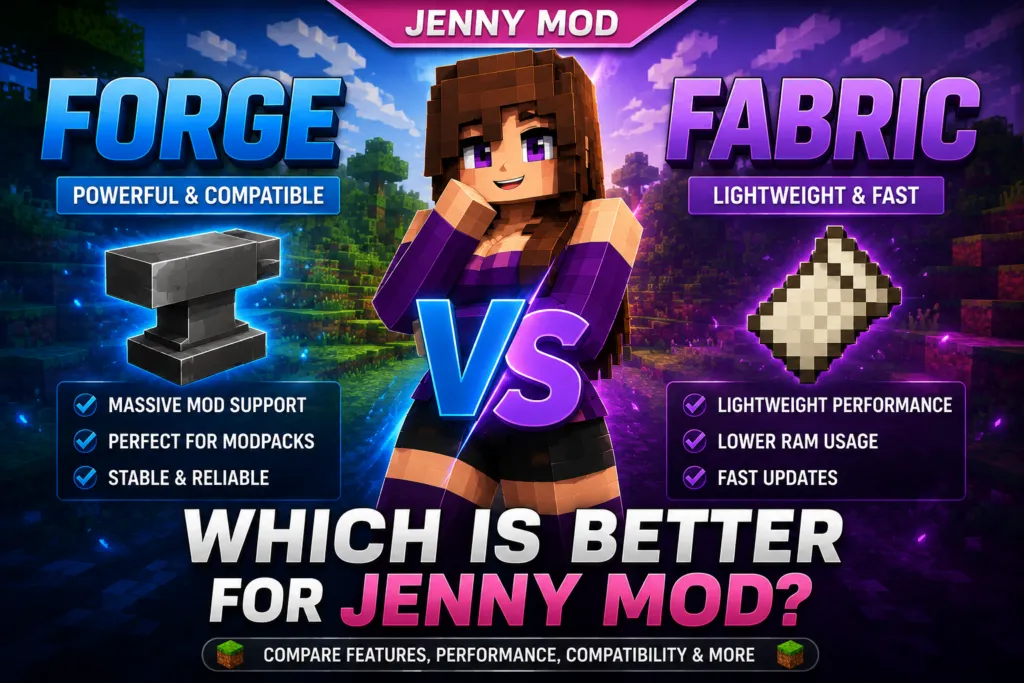
In this guide, we’ll compare Minecraft Forge and Fabric, explain how each mod loader works, discuss their compatibility with Jenny Mod, and help you determine which option is best for your gameplay style. Whether you’re new to Minecraft modding or looking to optimize your setup, this comparison will help you make an informed decision.
| Feature | Forge | Fabric |
|---|---|---|
| Primary Purpose | Traditional Minecraft Mod Loader | Lightweight Minecraft Mod Loader |
| Jenny Mod Compatibility | Yes (Compatible Releases) | Depends on the Specific Release |
| Performance | Good | Excellent |
| Startup Speed | Moderate | Fast |
| Memory Usage | Higher | Lower |
| Large Modpacks | Excellent | Good |
| Ease of Installation | Easy | Easy |
| Community Support | Very Large | Growing |
| Update Speed | Moderate | Fast |
| Best For | Large Mod Collections | Lightweight Gameplay & Performance |
What Is Minecraft Forge?
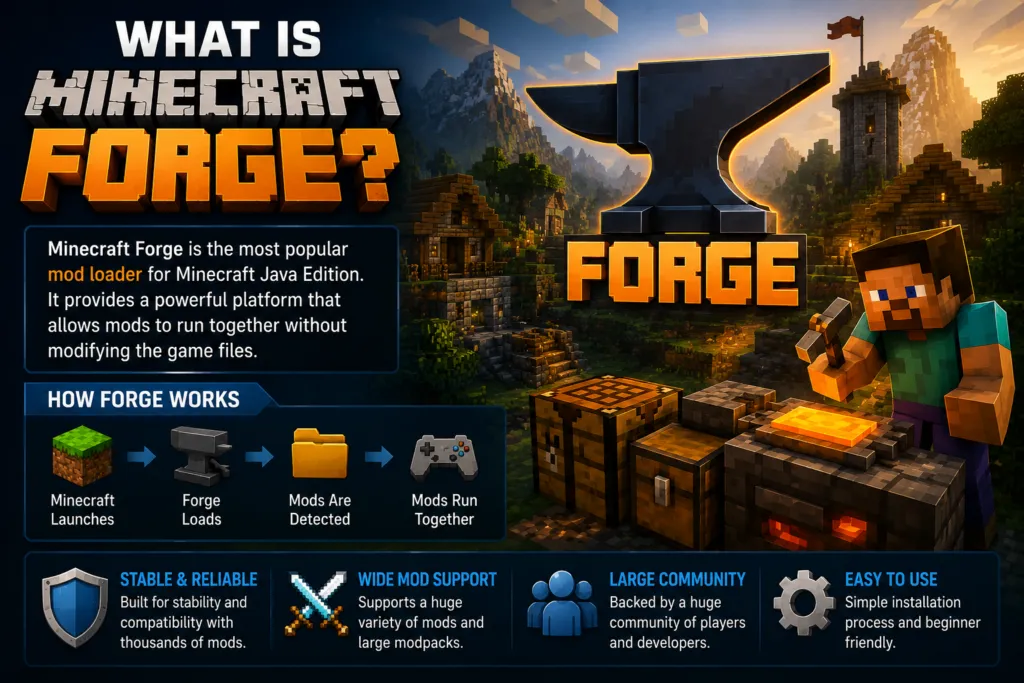
Minecraft Forge is the most widely used mod loader for Minecraft Java Edition. It provides a framework that allows community-created mods to work together without directly modifying Minecraft’s original game files. Since its introduction, Forge has become the standard platform for thousands of Minecraft mods and large modpacks.
One of Forge’s biggest strengths is its extensive compatibility. Many popular mods, including adventure, technology, magic, and world-generation mods, are built specifically for Forge. Because of its long history and large user base, Forge is often the first choice for players who want to install multiple mods in a single Minecraft world.
How Does Forge Work?
Forge acts as a bridge between Minecraft and community-created mods. Instead of altering Minecraft itself, Forge loads compatible mods during the game’s startup process. Each mod communicates with Forge, allowing different modifications to work together more reliably while reducing conflicts.
Players typically install Forge by downloading the installer that matches their Minecraft version. After installation, a Mods folder is created inside the Minecraft directory. Compatible mods are placed into this folder, and Forge loads them automatically when Minecraft starts.
Why Is Forge So Popular?
Forge has remained a favorite among Minecraft players for several reasons.
- Supports thousands of community-created mods.
- Excellent compatibility with large modpacks.
- Stable and mature development.
- Extensive documentation for developers.
- Large online community offering tutorials and support.
Its long-standing reputation makes Forge one of the easiest platforms for beginners to learn while also providing advanced features for experienced modders.
Forge and Jenny Mod
Most publicly available versions of Jenny Mod are designed to run with Minecraft Forge. This means players who want to use these releases typically need to install a Forge version that matches both the Minecraft version and the mod’s requirements.
Before downloading Jenny Mod, always check the mod’s documentation or download page to verify which Minecraft version and mod loader it supports. Installing a mismatched version may result in loading errors or crashes.
What Is Fabric?
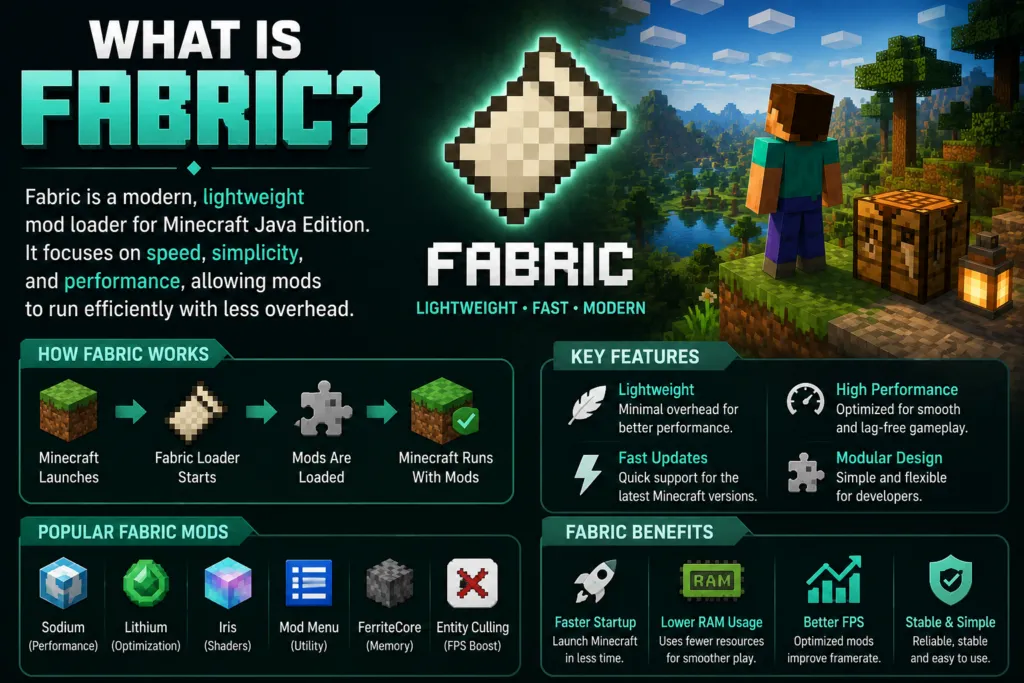
Fabric is a modern Minecraft mod loader designed to be lightweight, fast, and easy to update. Unlike Forge, which focuses on providing a large, feature-rich framework, Fabric keeps its core system minimal, allowing developers to build smaller, efficient mods with fewer dependencies.
Since its release, Fabric has become increasingly popular among players who value performance and quick support for new Minecraft updates. Because of its streamlined design, Fabric often receives compatibility updates soon after Mojang releases a new version of Minecraft.
How Does Fabric Work?
Fabric loads compatible mods through a lightweight loader that integrates with Minecraft Java Edition. Many Fabric mods also require the Fabric API, which provides additional tools and shared functionality for developers. Once Fabric is installed, players place compatible mods into the Mods folder, similar to Forge.
However, Forge mods and Fabric mods are generally not interchangeable. A mod created for one loader will usually not work with the other unless the developer specifically provides separate versions.
Why Do Players Choose Fabric?
Fabric has gained a strong reputation because it emphasizes simplicity and efficiency. Its advantages include:
- Faster game startup.
- Lower memory usage.
- Excellent performance on many systems.
- Rapid updates for new Minecraft releases.
- Strong support for optimization-focused mods.
Many players who prefer a near-vanilla Minecraft experience with improved performance choose Fabric because it introduces less overhead than larger modding frameworks.
Fabric and Jenny Mod
While Fabric supports many excellent Minecraft mods, compatibility with Jenny Mod depends entirely on the version you download.
Most public Jenny Mod releases are built for Forge, while some community-created adaptations may support Fabric. Before installing any version, carefully read the developer’s installation instructions to confirm which mod loader is required.
Using the wrong loader, whether Forge or Fabric, will prevent the mod from loading correctly. Matching the Minecraft version, mod loader, and Jenny Mod release is the best way to ensure a smooth installation and stable gameplay experience.
Forge vs Fabric Comparison
Both Forge and Fabric are excellent mod loaders for Minecraft Java Edition, but they are designed with different priorities. Forge focuses on compatibility and supporting large, feature-rich mods, while Fabric emphasizes speed, lightweight performance, and rapid updates.
Choosing between them depends on the type of Minecraft experience you want and, more importantly, which version of Jenny Mod you intend to install. Since mods are generally developed for one loader or the other, using the correct platform is essential.
The table below highlights the main differences between Forge and Fabric.
| Feature | Forge | Fabric |
|---|---|---|
| Release Year | 2011 | 2018 |
| Primary Focus | Broad Mod Compatibility | Lightweight Performance |
| Performance | Good | Excellent |
| Startup Speed | Moderate | Fast |
| Memory Usage | Higher | Lower |
| Update Speed | Moderate | Very Fast |
| Large Modpacks | Excellent | Good |
| Lightweight Mods | Good | Excellent |
| Community Size | Very Large | Growing |
| Learning Curve | Beginner Friendly | Beginner Friendly |
| Popular Optimization Mods | Limited | Extensive |
| Jenny Mod Compatibility | Most Public Releases | Only Compatible Versions |
Performance and Resource Usage
Fabric is designed to keep system resource usage low, which often results in quicker startup times and lower RAM consumption. Players with entry-level or older computers may notice smoother gameplay when using lightweight Fabric modpacks.
Forge uses a larger framework because it supports a wider variety of complex mods. Although this increases startup time and memory usage slightly, it provides excellent compatibility for players running multiple gameplay, technology, or adventure mods together.
Mod Availability
Forge has been the standard Minecraft mod loader for many years, giving it one of the largest mod libraries available. Many classic Minecraft mods continue to support Forge because of its mature ecosystem and widespread adoption.
Fabric’s library continues to grow rapidly, particularly among developers focused on optimization, quality-of-life improvements, and modern Minecraft versions. While its collection is smaller than Forge’s, it includes many highly regarded performance mods.
Updates
One advantage of Fabric is its ability to support new Minecraft versions quickly. Because of its lightweight architecture, Fabric updates are often released shortly after Mojang publishes a new Minecraft update.
Forge updates generally take longer since the project maintains a larger framework with more compatibility features. However, once released, Forge provides a stable environment for many complex mods.
Community Support
Both loaders have active communities, but Forge benefits from over a decade of documentation, tutorials, and community resources. Players can easily find installation guides, troubleshooting articles, and compatibility information for Forge-based mods. Fabric’s community has expanded significantly in recent years and now offers extensive documentation, active forums, and support for many popular optimization tools.
Which Mod Loader Supports Jenny Mod?
One of the most common questions players ask is whether Jenny Mod works with Forge or Fabric. The answer depends on the specific version of the mod you download.
Most Jenny Mod Releases Use Forge
The majority of publicly available Jenny Mod releases are developed for Minecraft Forge. These versions are intended to run on compatible Minecraft Java Edition releases using the Forge mod loader. If you’re downloading Jenny Mod from a trusted source like https://jennymodminecraft.app/, you’ll usually find installation instructions specifying:
- Supported Minecraft version
- Required Forge version
- Additional dependencies (if any)
Following these requirements is important because even small version differences can prevent the mod from loading correctly.
Some Versions Support Fabric
Although Forge remains the most common platform for Jenny Mod, some community-created adaptations have been developed for Fabric. These versions are separate releases and should not be confused with Forge editions.
Before installing any Fabric version, verify:
- It specifically states Fabric compatibility.
- It matches your Minecraft version.
- Any required dependencies, such as the Fabric API, are included.
Never assume that a Forge mod will automatically work with Fabric or vice versa.
Why Matching Versions Matters
Successful installation depends on three components working together:
- Minecraft Java Edition version
- Correct mod loader (Forge or Fabric)
- Compatible Jenny Mod release
If even one of these components does not match, Minecraft may display errors, ignore the mod entirely, or fail to launch.
For example:
- Minecraft 1.20 + Forge 1.20 + Jenny Mod built for Forge 1.20 → Compatible.
- Minecraft 1.20 + Fabric + Forge-only Jenny Mod → Not compatible.
Always read the download page carefully before installing any mod.
Performance Comparison
Performance is another important factor when deciding between Forge and Fabric. Although both loaders are capable of delivering a smooth Minecraft experience, their design philosophies lead to different results in certain situations.
Startup Time
Fabric generally launches Minecraft faster because its loader is smaller and includes fewer built-in components. Forge performs additional compatibility checks during startup, which can increase loading time, especially when many mods are installed.
Memory Usage
Fabric typically consumes less RAM than Forge, making it an attractive choice for players with limited system memory. Forge requires additional resources to support its extensive modding framework, particularly when running large collections of mods.
FPS During Gameplay
The mod loader itself usually has only a small impact on frame rates. Instead, overall performance depends on:
- The number of installed mods.
- The complexity of those mods.
- Your computer’s hardware.
- Graphics settings and render distance.
Fabric often performs better when paired with optimization mods, while Forge provides consistent performance in larger, feature-rich modpacks.
Large Modpacks
If you enjoy installing dozens or even hundreds of Minecraft mods together, Forge is often the preferred choice. Its mature ecosystem is designed to support complex mod interactions and extensive gameplay changes, making it popular among players who build large custom modpacks.
Lightweight Gameplay
Players who want Minecraft to stay close to the vanilla experience while improving performance frequently choose Fabric. Its lightweight design, combined with popular optimization mods, offers a responsive experience without requiring extensive system resources.
For Jenny Mod, however, performance should not be the only consideration. The most important factor is choosing the mod loader required by the specific Jenny Mod release you plan to install. In most cases, that means using Forge, while certain community-created versions may support Fabric if explicitly stated by the developer.
Installation Comparison
Both Forge and Fabric are relatively easy to install, but the setup process differs slightly because each uses its own installer and supporting tools. Before installing either mod loader, make sure you have the correct version of Minecraft Java Edition and verify which loader your chosen version of Jenny Mod requires.
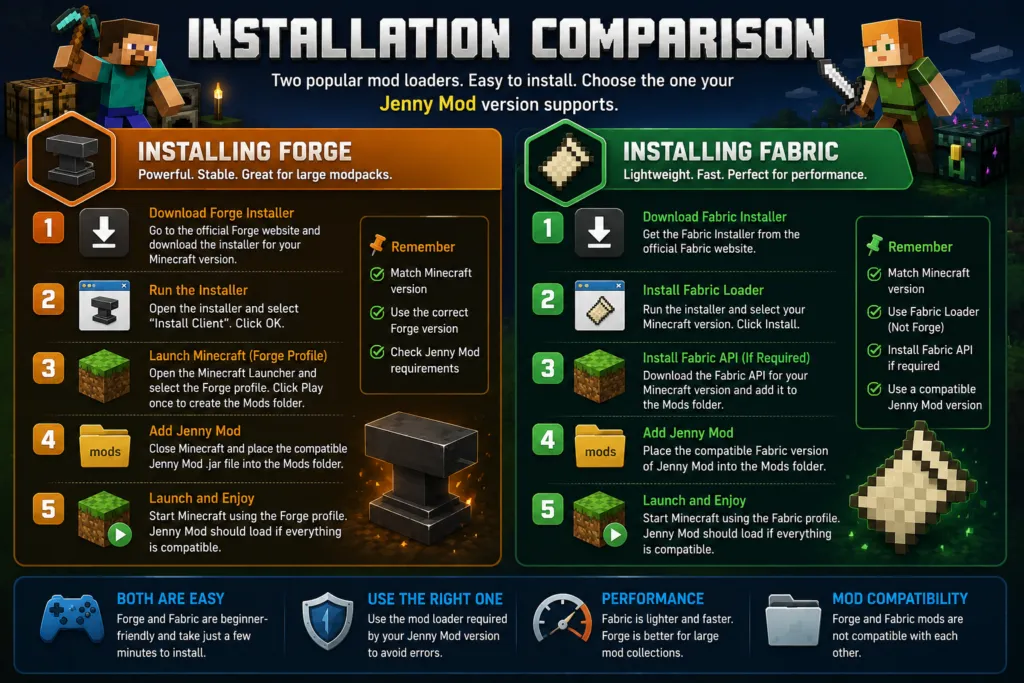
Installing the wrong mod loader or using an incompatible Minecraft version is one of the most common reasons mods fail to load.
Installing Minecraft Forge
Forge has a straightforward installation process and is supported by a large number of tutorials and community resources. To install Forge:
- Download the Forge installer that matches your Minecraft version.
- Run the installer and select Install Client.
- Launch the Minecraft Launcher.
- Select the Forge profile that was created during installation.
- Start Minecraft once to generate the Mods folder.
- Close the game and place the compatible Jenny Mod file into the Mods folder.
- Launch Minecraft using the Forge profile.
If the Minecraft version, Forge version, and Jenny Mod version all match, the mod should load successfully.
Installing Fabric
Fabric is also easy to install and follows a similar process. To install Fabric:
- Download the Fabric Installer.
- Install the Fabric Loader for your Minecraft version.
- Install the Fabric API if the mod requires it.
- Launch Minecraft using the Fabric profile.
- Open the Mods folder.
- Copy the compatible Fabric version of Jenny Mod into the folder.
- Restart Minecraft.
Remember that a Forge version of Jenny Mod will not work with the Fabric Loader unless the developer has released a separate Fabric-compatible version.
Which Installation Is Easier?
Both installers are beginner-friendly and can usually be completed in just a few minutes. Forge benefits from years of documentation and extensive community tutorials, making troubleshooting easier for first-time users.
Fabric, however, has a smaller installation footprint and often updates more quickly for new Minecraft releases. For most players, the easiest choice is simply to install the loader recommended by the specific version of Jenny Mod they intend to use.
Compatibility with Other Mods
One of the biggest differences between Forge and Fabric is the type of mods each platform supports. While both loaders have active communities, their mod libraries are separate, meaning a mod created for one loader generally will not work with the other.
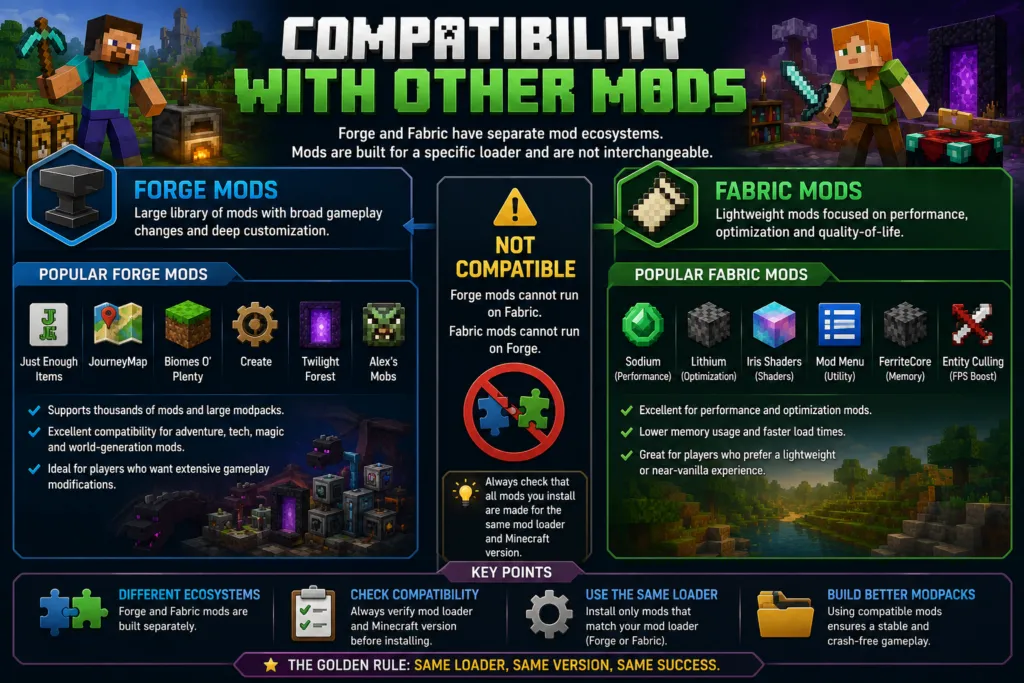
Before building a custom modpack, always check that every mod supports the same loader and Minecraft version.
Popular Mods for Forge
Forge has one of the largest collections of Minecraft mods available. Popular Forge-compatible mods include:
- Just Enough Items (JEI)
- JourneyMap
- Biomes O’ Plenty
- Alex’s Mobs
- Create
- Twilight Forest
Many large adventure and technology modpacks are built around Forge because of its mature ecosystem and broad compatibility.
Popular Mods for Fabric
Fabric is well known for performance-focused and lightweight mods. Common Fabric-compatible mods include:
- Sodium
- Lithium
- Iris Shaders
- Mod Menu
- FerriteCore
- Entity Culling
These mods are popular among players who want better performance while keeping Minecraft close to its vanilla gameplay.
Mixing Forge and Fabric Mods
A common misconception is that Forge and Fabric mods can be installed together in the same Minecraft profile. In most cases, this is not possible.
A Forge-only mod requires the Forge Loader, while a Fabric-only mod requires the Fabric Loader. Unless a developer provides versions for both platforms, the mods cannot be mixed. When creating a modded Minecraft setup, ensure that all installed mods are designed for the same loader.
Pros and Cons
Forge Pros
- Supports one of the largest Minecraft mod libraries.
- Excellent compatibility with large modpacks.
- Stable and well-established ecosystem.
- Extensive tutorials and community support.
- Most public Jenny Mod releases are designed for Forge.
Forge Cons
- Slower startup compared to Fabric.
- Higher RAM usage with larger modpacks.
- Updates for new Minecraft versions may take longer.
- Larger installation footprint.
Fabric Pros
- Lightweight and fast.
- Lower memory usage.
- Faster startup times.
- Quick support for new Minecraft updates.
- Excellent platform for optimization mods.
Fabric Cons
- Smaller mod library than Forge.
- Some popular mods are available only for Forge.
- Jenny Mod compatibility depends on the specific release.
- Certain large modpacks are still primarily built around Forge.
Which One Should You Choose?
The right choice depends on your goals and the version of Jenny Mod you plan to install. If your priority is using the original or most commonly available Jenny Mod releases, Forge is usually the better option because it supports the majority of public versions. It also provides excellent compatibility with larger mod collections, making it ideal for players who enjoy heavily customized Minecraft worlds.
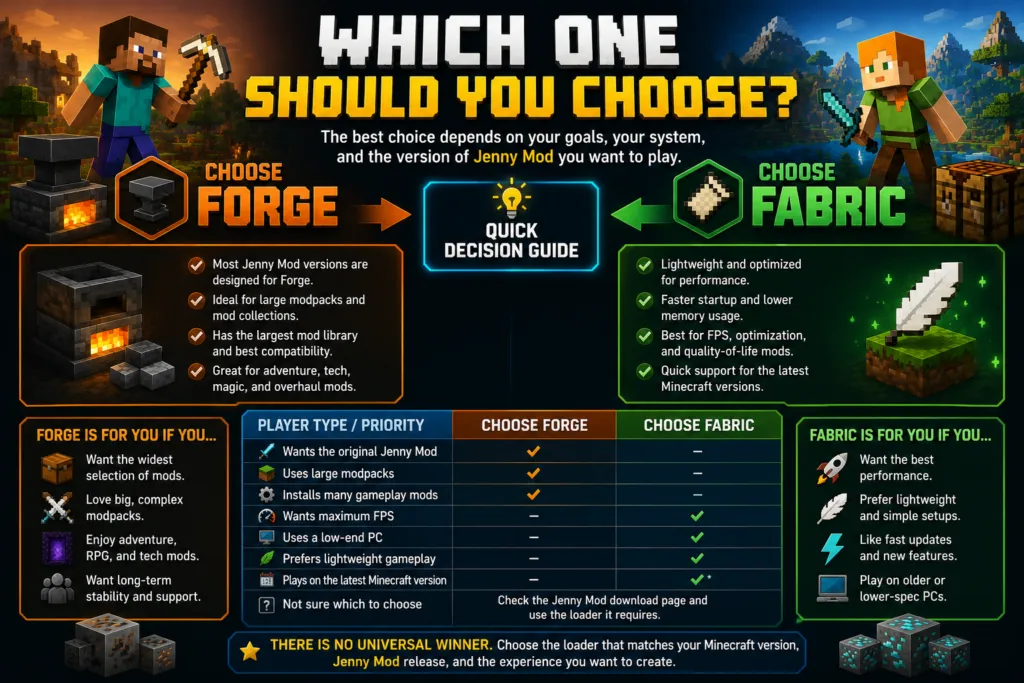
If your focus is performance, fast startup times, or staying current with the latest Minecraft updates, Fabric is an excellent alternative. Its lightweight design makes it particularly attractive for players using lower-end hardware or those who prefer a simpler, near-vanilla experience. However, you’ll need to confirm that the Jenny Mod version you download has been specifically developed for Fabric.
The table below provides a quick recommendation based on different player needs.
| Player Type | Recommended Mod Loader |
|---|---|
| Wants the original Jenny Mod | Forge |
| Uses large modpacks | Forge |
| Installs many gameplay mods | Forge |
| Wants maximum FPS | Fabric |
| Uses a low-end PC | Fabric |
| Prefers lightweight gameplay | Fabric |
| Plays on the latest Minecraft version | Fabric (if supported) |
| Unsure which loader to choose | Check the Jenny Mod download page and use the loader it requires |
Ultimately, there is no universal winner. Both Forge and Fabric are reliable mod loaders, and the best choice is the one that matches your Minecraft version, Jenny Mod release, and the type of gameplay experience you want to create.
Frequently Asked Questions
1. Is Forge or Fabric better for Jenny Mod?
For most publicly available versions, Forge is the better choice because many Jenny Mod releases are developed specifically for the Forge mod loader. Always check the mod’s documentation to confirm compatibility.
2. Does Jenny Mod work with Fabric?
Some community-created versions may support Fabric, but not every release does. Verify that the download page explicitly lists Fabric as a supported mod loader before installing.
3. Can I use Forge and Fabric at the same time?
Forge and Fabric cannot run together in the same Minecraft profile. If you want to use both, you’ll need separate Minecraft installations or launcher profiles.
4. Which mod loader is faster?
Fabric generally starts Minecraft faster because it has a lightweight architecture with fewer built-in components than Forge.
5. Which mod loader uses less RAM?
Fabric typically consumes less memory, making it a good option for players with older or lower-spec computers.
6. Which loader supports more Minecraft mods?
Forge has the larger mod library due to its long history and widespread adoption within the Minecraft modding community.
7. Is Forge easier for beginners?
Yes. Forge has extensive documentation, tutorials, and community support, making it beginner-friendly for players new to Minecraft modding.
8. Is Fabric better for performance?
Fabric is widely known for its excellent performance and is often paired with optimization mods to improve FPS and reduce loading times.
9. Can I install a Forge mod on Fabric?
No. Forge mods and Fabric mods are built for different loaders and are generally not compatible unless the developer provides separate versions.
10. Can I install a Fabric mod on Forge?
No. Fabric mods require the Fabric Loader and cannot be loaded through Forge.
11. Does Forge reduce FPS?
Forge itself has only a small impact on performance. Your frame rate depends more on the number and complexity of the installed mods and your computer’s hardware.
12. Does Fabric improve Minecraft FPS?
Fabric can help improve performance when used with optimization-focused mods, but the exact improvement varies depending on your system and installed mods.
13. Do I need the Fabric API?
Many Fabric mods require the Fabric API to function correctly. Always read the installation instructions provided by the mod developer.
14. Can I switch from Forge to Fabric later?
Yes. You can install Fabric after using Forge, but you’ll need to use mods that are compatible with the Fabric Loader. Existing Forge-only mods will not work unless Fabric versions are available.
15. Which Minecraft edition supports Forge and Fabric?
Both Forge and Fabric are designed for Minecraft Java Edition. They are not compatible with Minecraft Bedrock Edition.
16. Which loader receives updates first?
Fabric usually supports new Minecraft releases sooner because its lightweight framework is quicker to update.
17. Which loader is better for large modpacks?
Forge is generally the preferred choice for large, feature-rich modpacks because it supports a broad range of gameplay and content mods.
18. How do I know which loader Jenny Mod requires?
Check the official download page or documentation for the version you’re installing. It should clearly state whether the mod is designed for Forge or Fabric and list the supported Minecraft version.
Conclusion
Choosing between Forge and Fabric ultimately depends on the version of Jenny Mod you want to install and the type of Minecraft experience you’re looking for. Both mod loaders are reliable, actively maintained, and widely used by the Minecraft community, but they serve different purposes.
If your goal is to play the original or most commonly available Jenny Mod releases, Forge is usually the recommended option. Its mature ecosystem, extensive mod library, and strong compatibility with large modpacks make it the preferred choice for many players. On the other hand, if you prioritize faster startup times, lower memory usage, and performance-focused gameplay, Fabric is an excellent alternative, as long as the Jenny Mod version you download is specifically built for it.
Before installing any mod, always confirm three key details: your Minecraft Java Edition version, the required mod loader, and the compatible Jenny Mod release. Matching these components will help prevent crashes, loading errors, and compatibility issues. By selecting the right mod loader and following the developer’s installation instructions, you’ll enjoy a smoother and more stable Minecraft modding experience.